
Amazon Strategist, 7-Figure Seller & Founder of AmazingCreative
If you want one of the fastest ways to increase Amazon sales without touching PPC, start with your main image.
Your main image is what gets the click.
Before shoppers read your bullets, scroll your A+ Content, watch your videos, or care about your full listing, they see your product in search.
And on Amazon search, shoppers are moving fast. They usually make a decision based on a few things:
Main image
Price
Reviews
Star rating
Title
Coupon or offer
Delivery time
But visually, the main image does the heavy lifting.
That’s why main image optimization is one of the easiest, lowest-hanging-fruit ways to improve click-through rate and get more qualified shoppers into your listing.
The main image gets the click.
The listing has to convert the shopper after that.
So in this guide, I’ll break down how I think about Amazon main image optimization, what makes a good image, what to test, and how to use Amazon experiments to find the winner.
Quick Answer: How Do You Optimize an Amazon Main Image?
You optimize an Amazon main image by making the product easy to understand, visually competitive on page one, and clear enough for shoppers to understand the key value at a glance.
A good Amazon main image should:
Clearly show what the product is
Fill the available image space
Highlight the most important buying information
Make the USP easy to understand
Stand out from competitors
Look high-quality and trustworthy
Work well on mobile
Attract the right shopper
Be tested against other concepts
The goal is simple:
Get more qualified shoppers to click your listing.
Not just more clicks.
Better clicks.
Why Your Amazon Main Image Matters So Much

I think of the main image like an Amazon billboard.
A billboard does not explain every detail.
It grabs attention, communicates the key idea fast, and gets someone to take the next step.
Your main image has the same job.
If thousands of shoppers are seeing your product in search, even a small lift in click-through rate can create a big increase in traffic.
And if your listing converts well, that extra traffic can turn into more sales.
That’s why I would not treat the main image like a random product photo.
It is a sales asset.
If you want the full-page CRO side after the click, I’d read the Amazon Conversion Rate Optimization Guide too, because the main image gets the click, but the page still has to convert.
The Big Mistake: Using a Basic Product Photo and Calling It Good
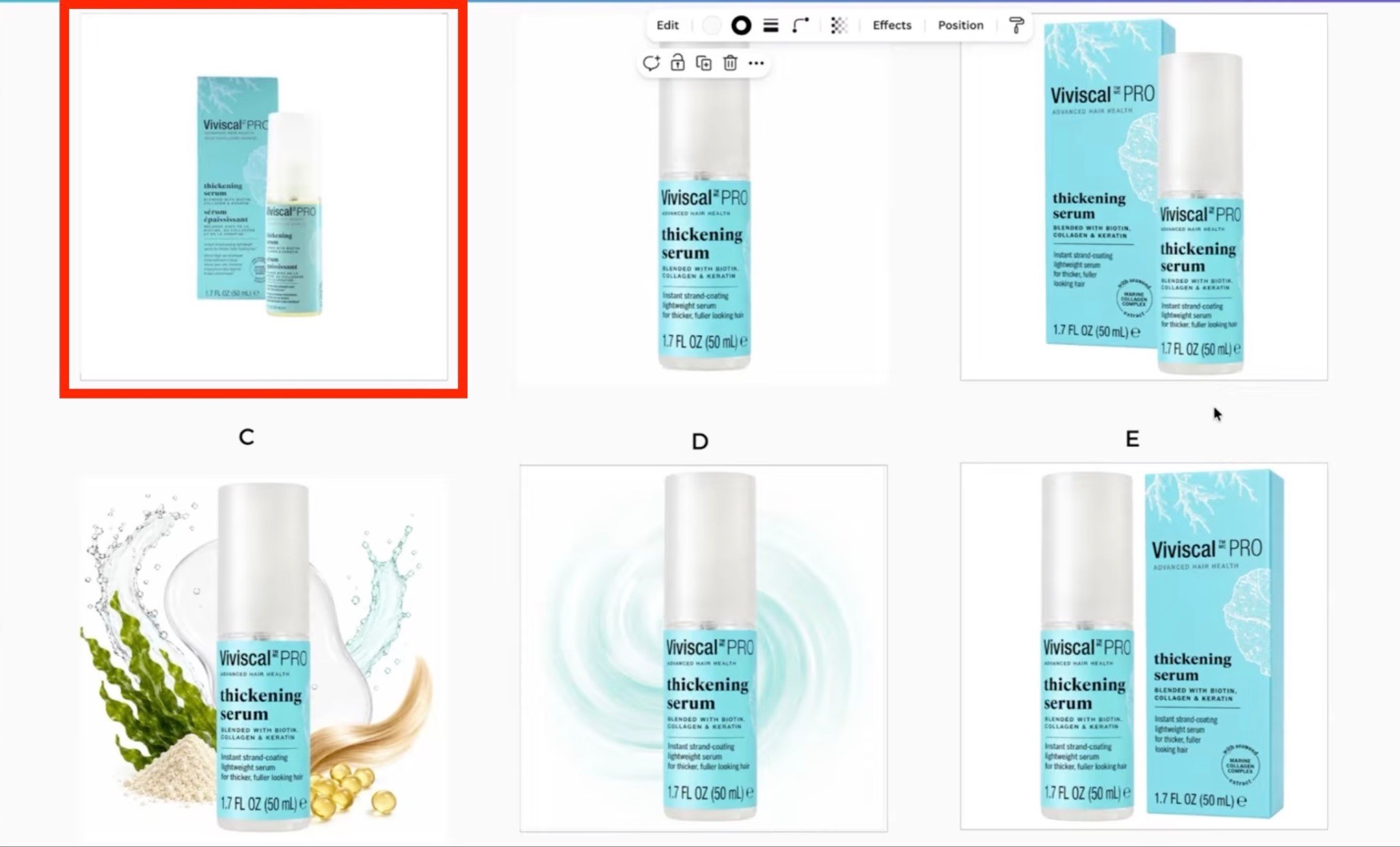
What does not work anymore is just uploading a regular product photo on a white background and hoping it gets a good CTR.
Amazon is too competitive now.
You need to think about what shoppers actually care about and make that information obvious.
Depending on the product, shoppers may care about:
Serving count
Quantity
Size
Dose
Main ingredient
Flavor
Bundle items
Packaging
Certifications
Use case
Color options
Product scale
Value per serving
If that information is tiny, hidden, or hard to understand in search, the shopper may scroll right past you.
Your main image should make the most important buying information glanceable.
That is the game.
The Four Pillars of Amazon Main Image CTR Optimization
Here’s the simple framework I use.
1. Make the Key Information Bigger
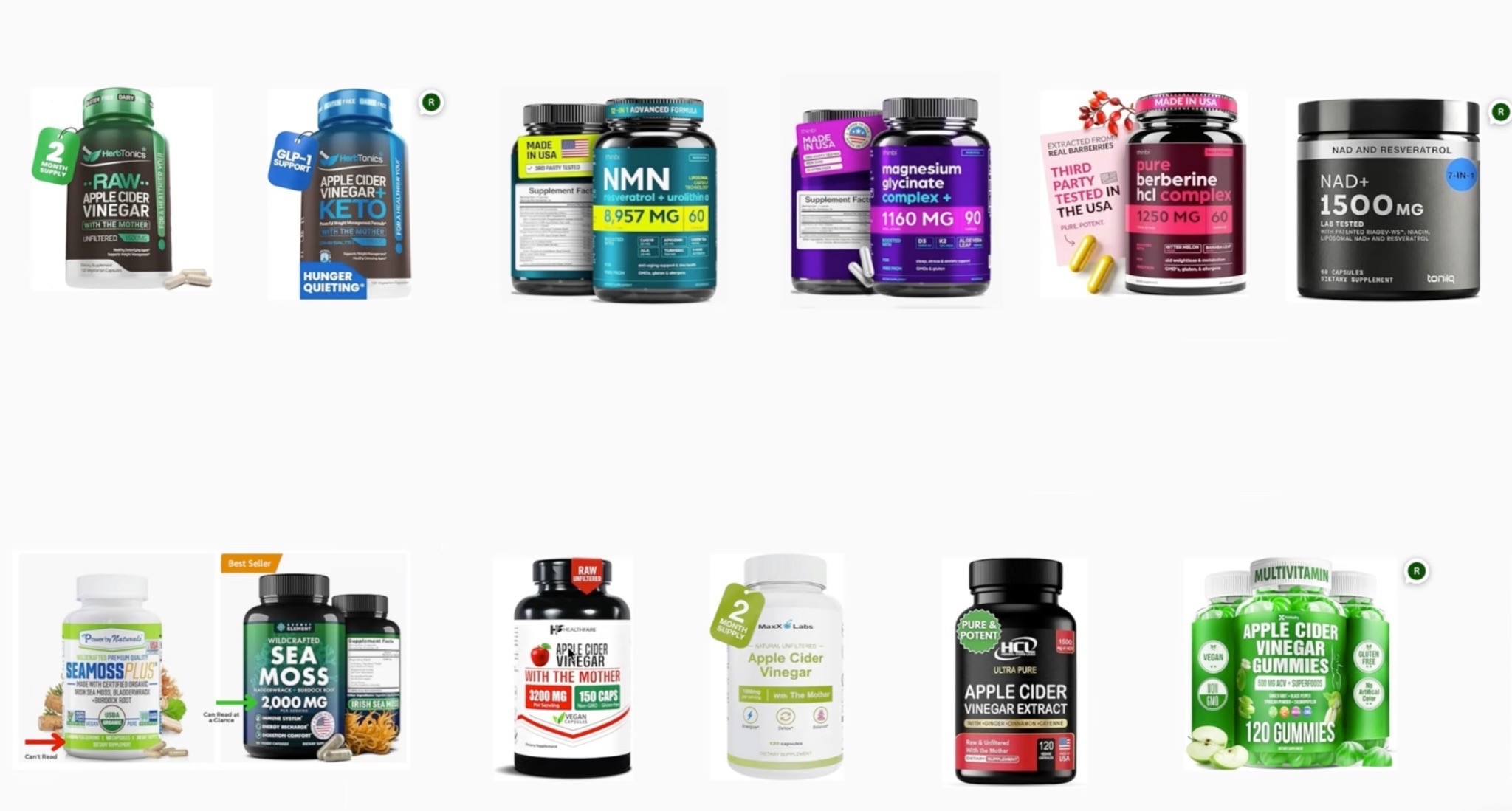
The most important product information should be easy to understand at a glance.
That could be:
Milligrams
Servings
Capsules
Quantity
Weight
Flavor
Main ingredient
Certification
Bundle size
If the key USP is 75 servings, make that obvious.
If the key USP is 30% IgG, make that obvious.
If it is a value pack, make that obvious.
Do not make shoppers zoom in or read tiny packaging text.
2. Make the Colors Pop
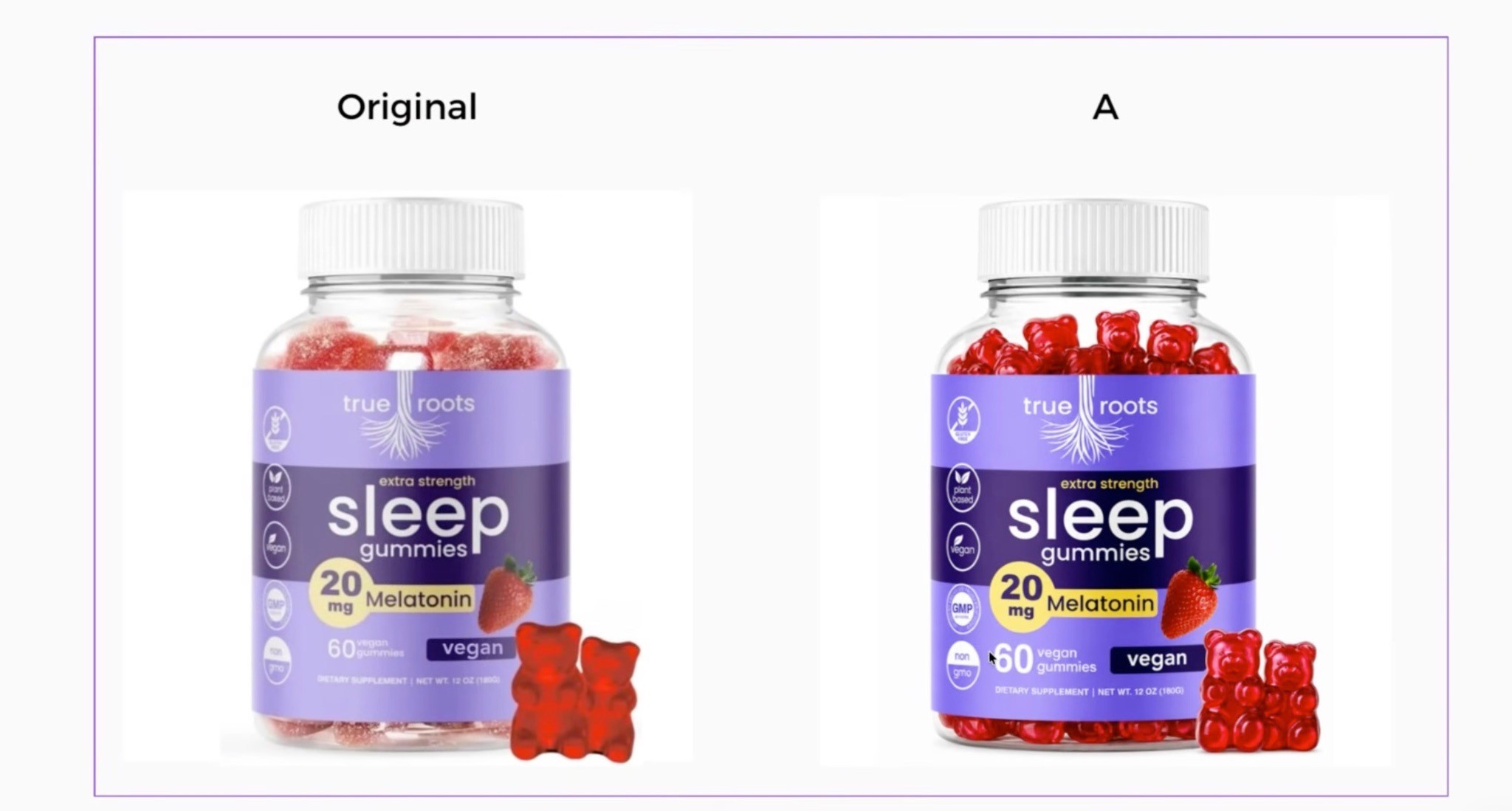
A lot of main images look flat, dull, dark, or low contrast.
Sometimes simply improving color, brightness, sharpness, or contrast can help the product stand out more in search.
You do not want it to look fake.
You want it to look alive.
3. Use the Box or Packaging When It Helps
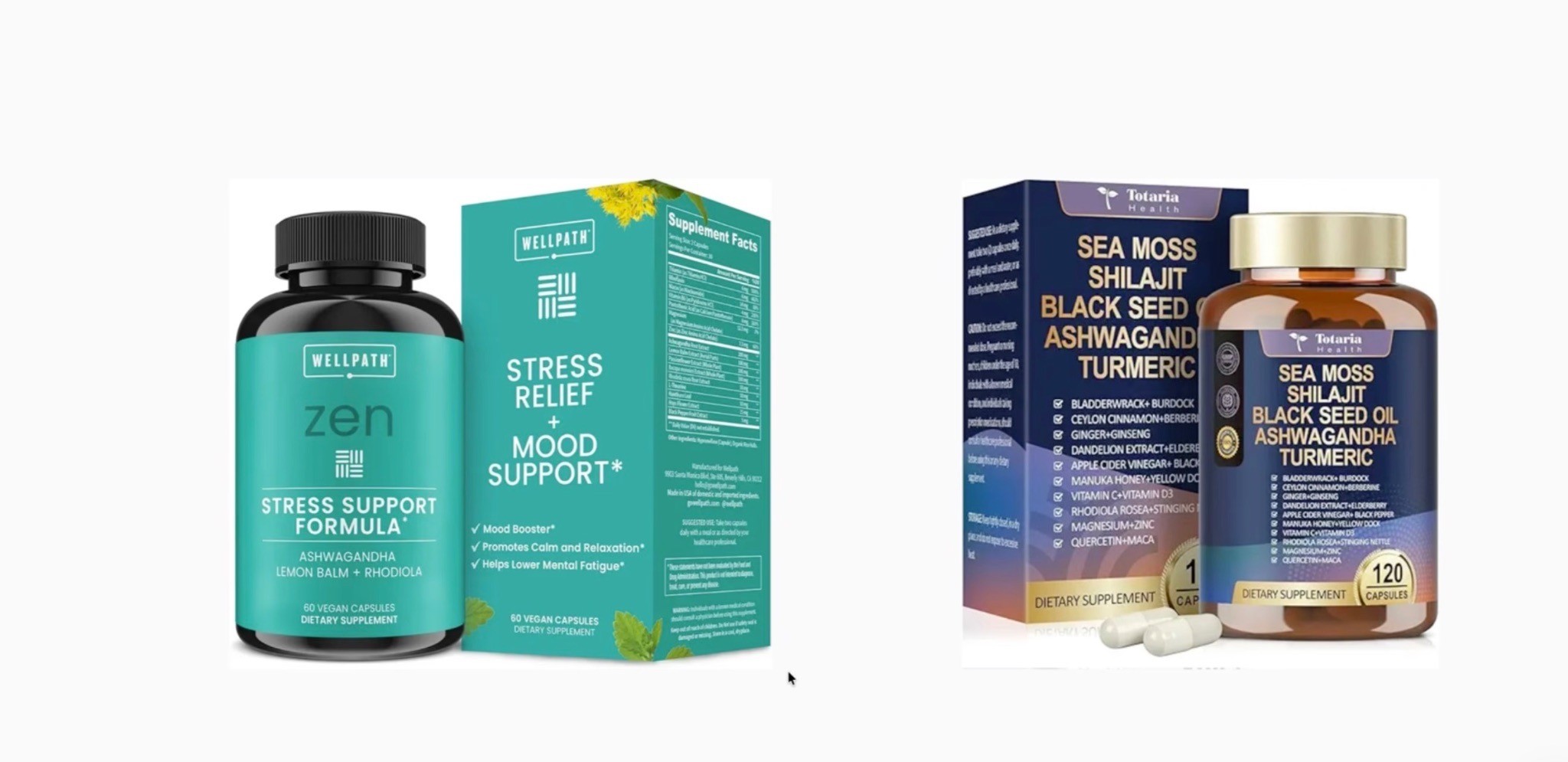
Packaging can give you more real estate to show important information.
This can work well for:
Supplements
Beauty products
Pet products
Food products
Bundles
Multi-packs
Premium CPG products
But only use the box if it actually helps.
If the packaging does not communicate value or makes the image worse, skip it.
4. Add Supporting Elements Carefully
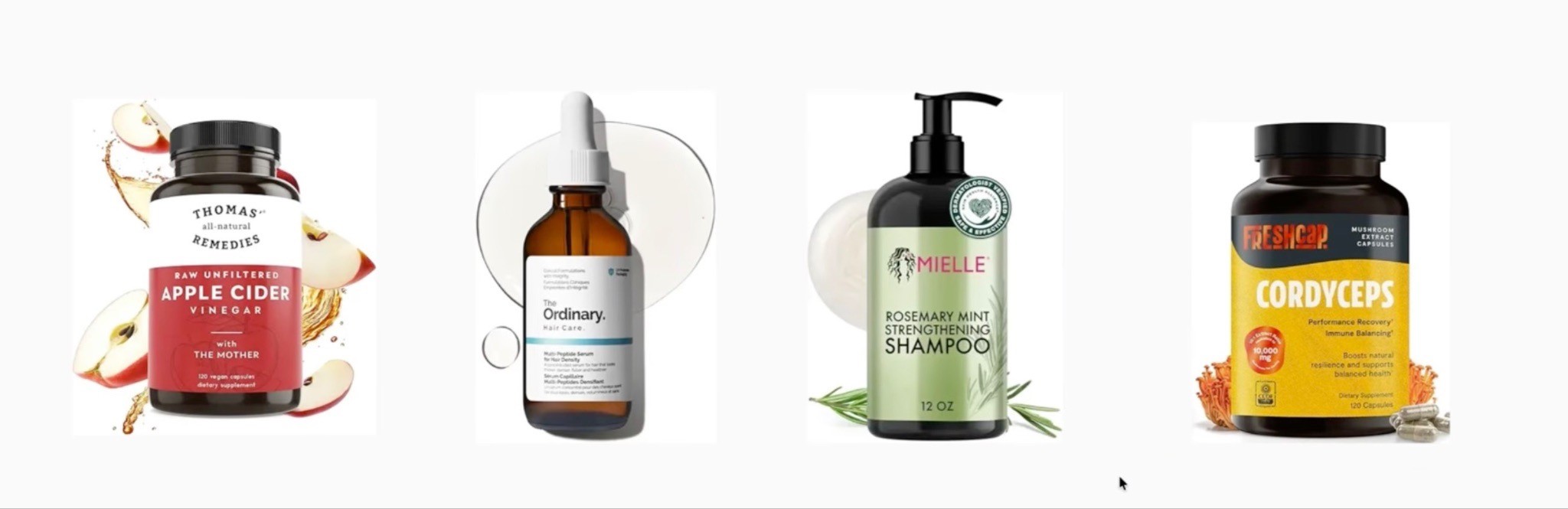
Sometimes adding supporting elements helps shoppers understand the product faster.
Examples:
Capsules
Gummies
Powder scoop
Flavor cue
Product pieces
Bundle items
Size reference
Ingredient visual
Compatible device or accessory
But every element needs a job.
If it does not help the shopper understand or click, it probably does not belong.
What Makes a Good Amazon Main Image?
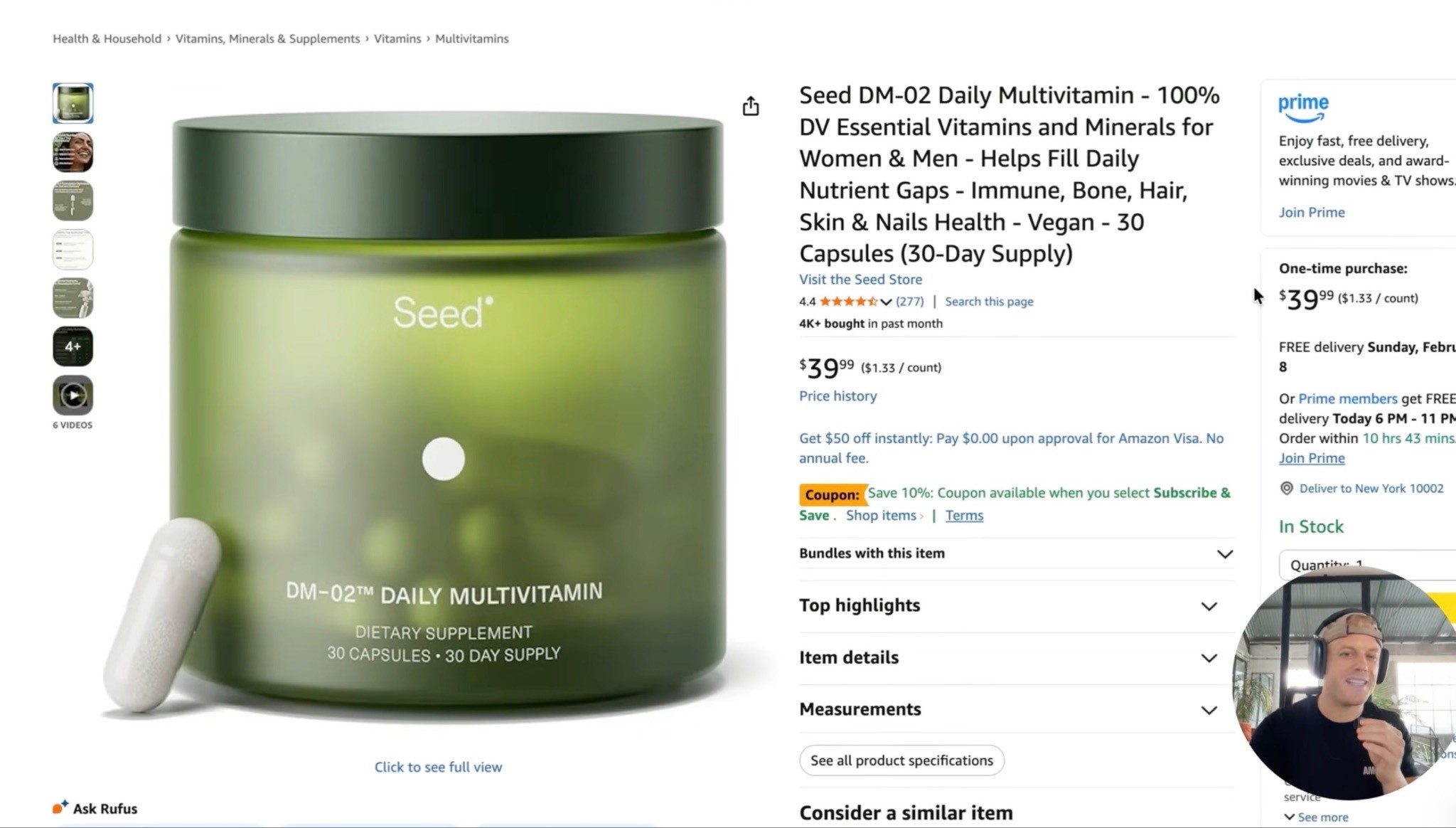
A good main image does three things:
Clearly shows what the product is
Highlights the product’s most important value
Stands out from competitors
That sounds simple, but most brands mess this up.
They make the image too plain, too small, too cluttered, or too generic.
If the product is a multi-pack, show the quantity.
If the package is large, show the size.
If the product has a key dose, serving count, ingredient, or bundle, make that easy to understand.
The main image should remove confusion before the shopper opens the listing.
Do Not Judge Your Main Image by Itself
This is a big mistake.
A lot of sellers look at their main image alone and say:
“Looks good.”
That means nothing.
Your main image lives on page one next to every competitor.
So search your main keyword and look at the actual search results.
Ask yourself:
Does my image stand out?
Does it look clear on mobile?
Does it look premium?
Does it show enough value?
Does it communicate the product fast?
Does it look better than nearby competitors?
That is the real test.
The Main Image Research Process
Do not just open Canva, Photoshop, or ChatGPT and start guessing.
Do the research first.
Step 1: Identify the Main Keyword
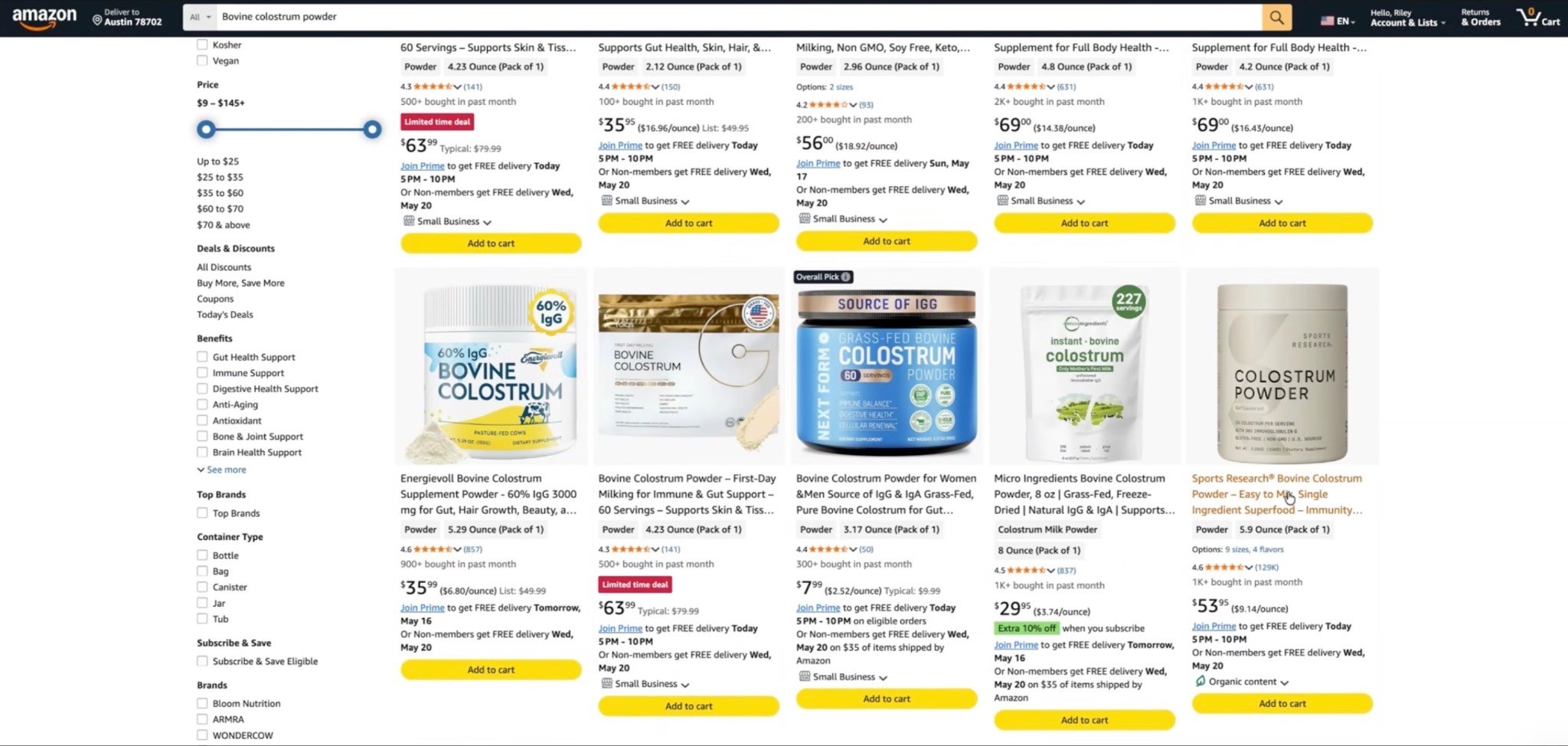
Start with the keyword shoppers use to find the product.
For example:
Bovine colostrum powder
Creatine gummies
Dog shampoo
Electrolyte powder
Magnesium glycinate
Phone wallet
Your image has to work in that search result.
Step 2: Study Page One
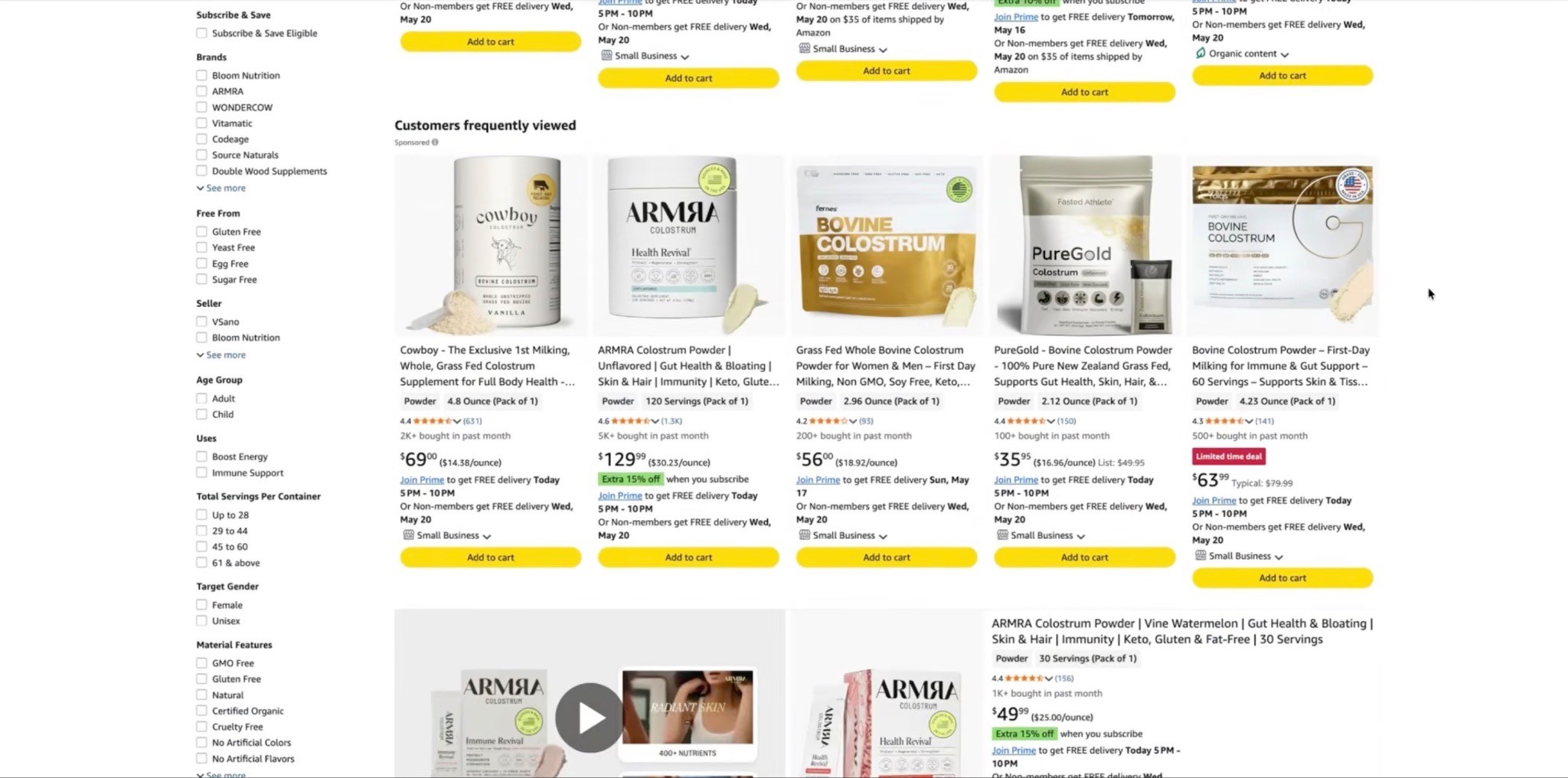
Look at the top products and notice:
How big the product looks
What information they show
Which colors stand out
Whether they show packaging
Whether they show capsules, gummies, powder, or accessories
Whether they use enlarged label details or callouts
How clear the images are on mobile
You are looking for patterns and gaps.
What is everyone doing?
What is missing?
How can you stand out while still looking category-appropriate?
Step 3: Understand the Product’s USP
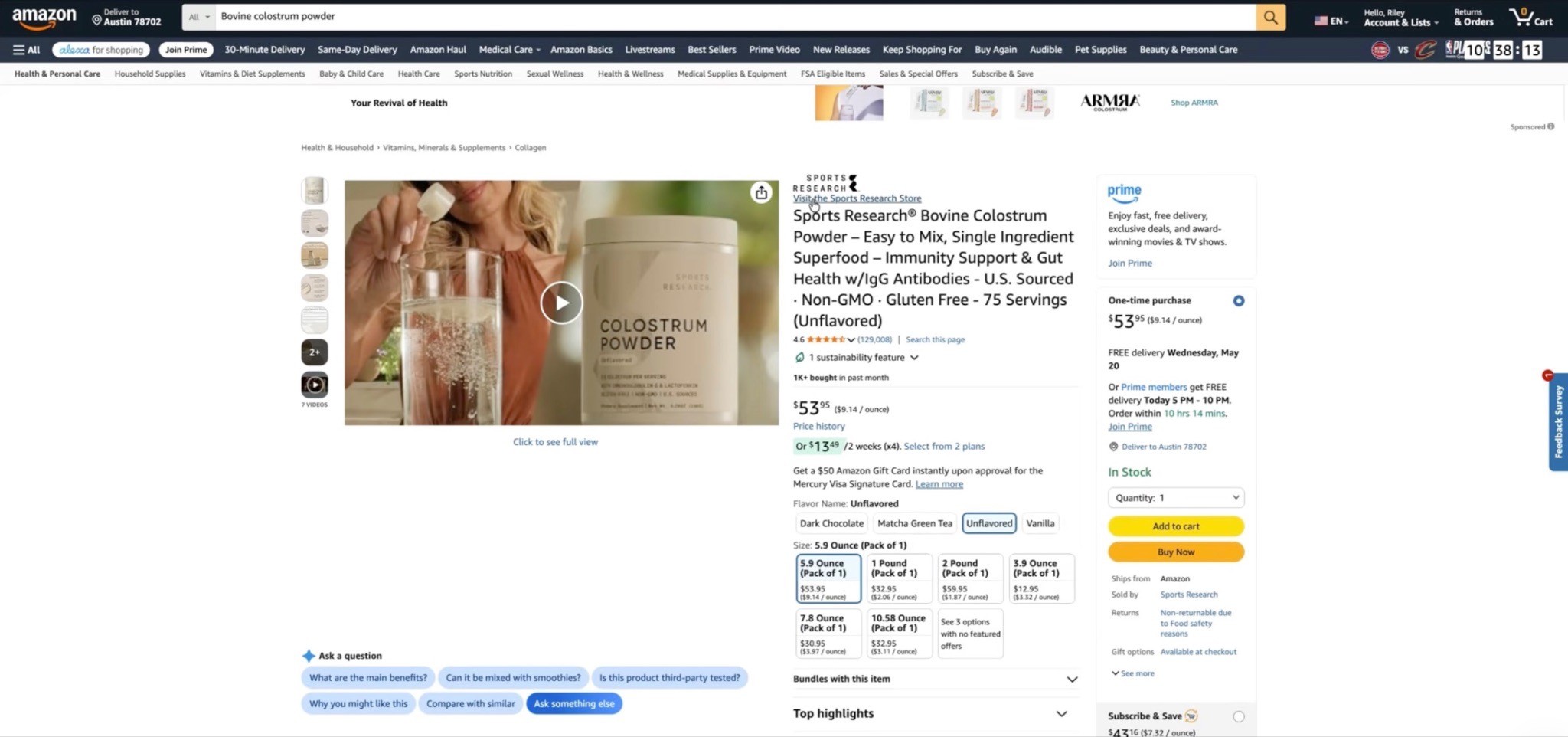
Do not outsource your brain to AI.
AI can help, but you still need to read the listing yourself.
Look for the main reason someone should buy this product instead of the competitor.
That might be:
Higher dose
Better ingredient
More servings
Better value
Cleaner formula
Certification
Bundle
Use case
Better packaging
You need to know the USP before designing the main image.
Step 4: Build Multiple Concepts
Do not create one image and hope.
Create multiple concepts.
You do not know which one will win until you test.
How AI Can Help With Amazon Main Images
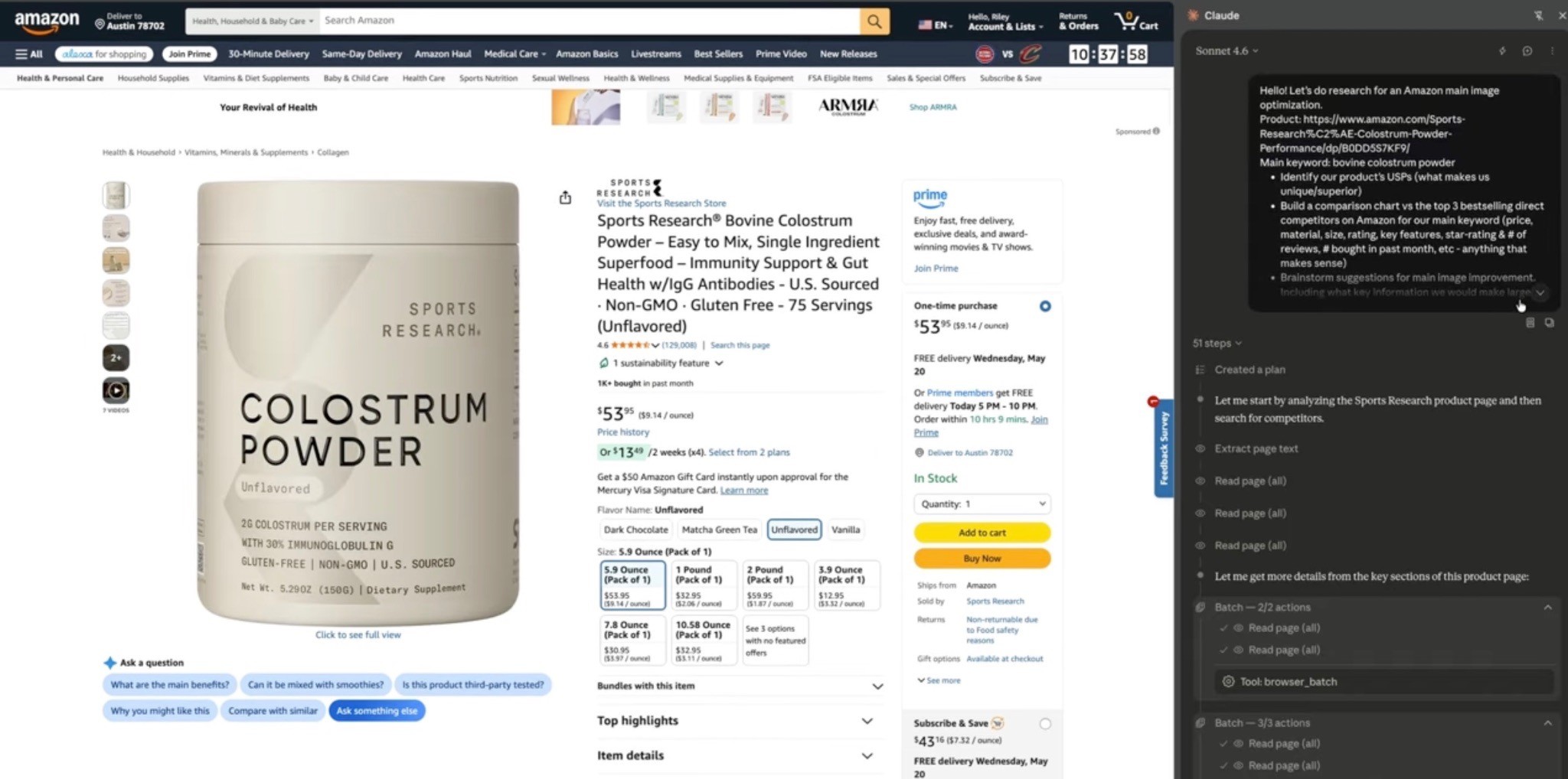
AI can make the process way faster.
Claude can help research the listing, competitors, USPs, and shopper priorities.
ChatGPT can help create image variations, test visual concepts, and speed up design iteration.
But AI does not replace strategy.
The mistake is letting AI do all the thinking.
You still need to understand:
The product
The shopper
The category
The competitors
The USP
What Amazon shoppers actually care about
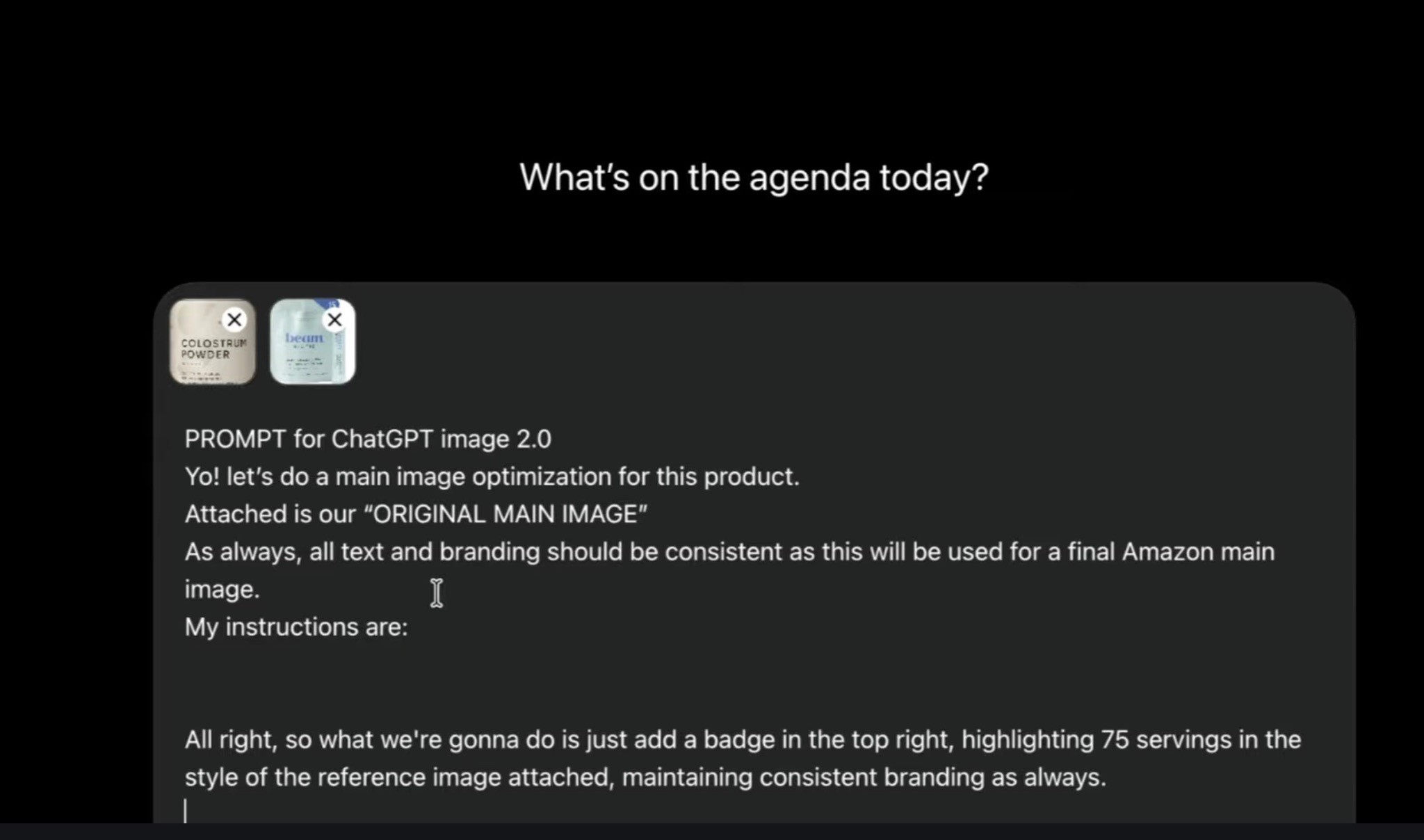
A good AI-assisted workflow looks like this:
Research competitors
Identify the strongest USPs
Brainstorm image improvements
Create several concepts
Pick the strongest versions
Test them in Amazon Manage Your Experiments
Keep iterating based on data
AI speeds up the process.
It does not replace the marketer.
I broke this down visually in my YouTube walkthrough, How to 2x Your CTR w/ ChatGPT in 20 Mins, where I show how I use Claude and ChatGPT to research the listing, find the USP, create main image concepts, and turn those ideas into testable image variations. Check it out!
Main Image Ideas Worth Testing
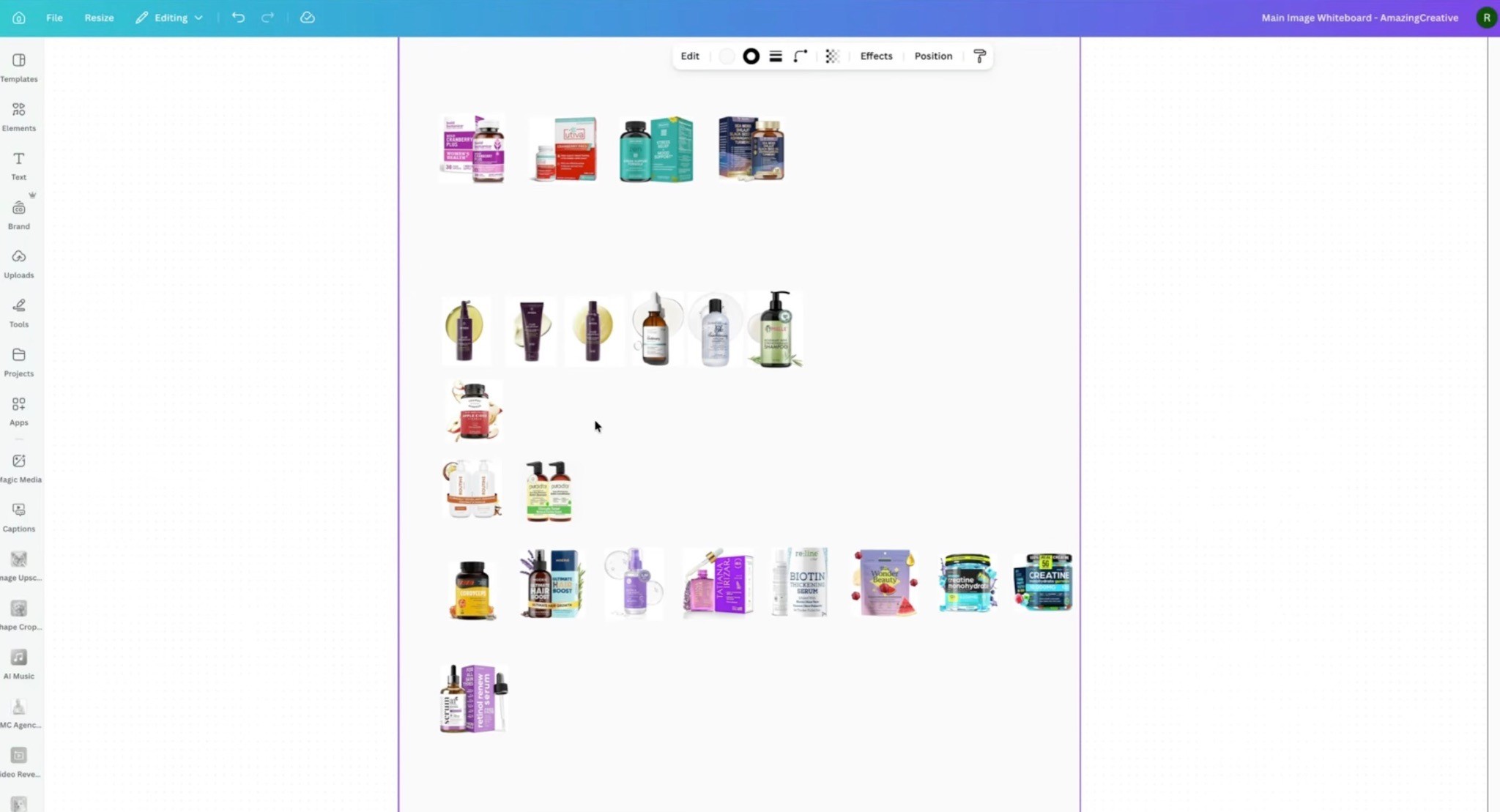
Here are the concepts I’d consider depending on the product.
1. Bigger Product
If your product looks tiny next to competitors, test making it bigger.
2. Capsules, Gummies, Powder, or Product Pieces
For supplements, beauty, food, and CPG, showing the actual form of the product can help shoppers understand what they are buying.
3. Enlarged Key Information
Test making important information easier to see, like:
75 servings
30% IgG
2,000 mg per serving
120 capsules
1.5 lbs
Value pack
Sugar-free
Third-party tested
4. Box or Packaging
If the packaging helps communicate value, test showing it.
5. Bundle or What’s Included
If the product includes multiple items, show them.
6. Size or Scale Cue
If size matters, make it clear.
7. Flavor or Ingredient Cue
If flavor or ingredient is a buying driver, test a clean visual cue.
8. Color or Variation Test
Sometimes a different color or variation performs better than expected.
You will not know until you test.
How to A/B Test Amazon Main Images
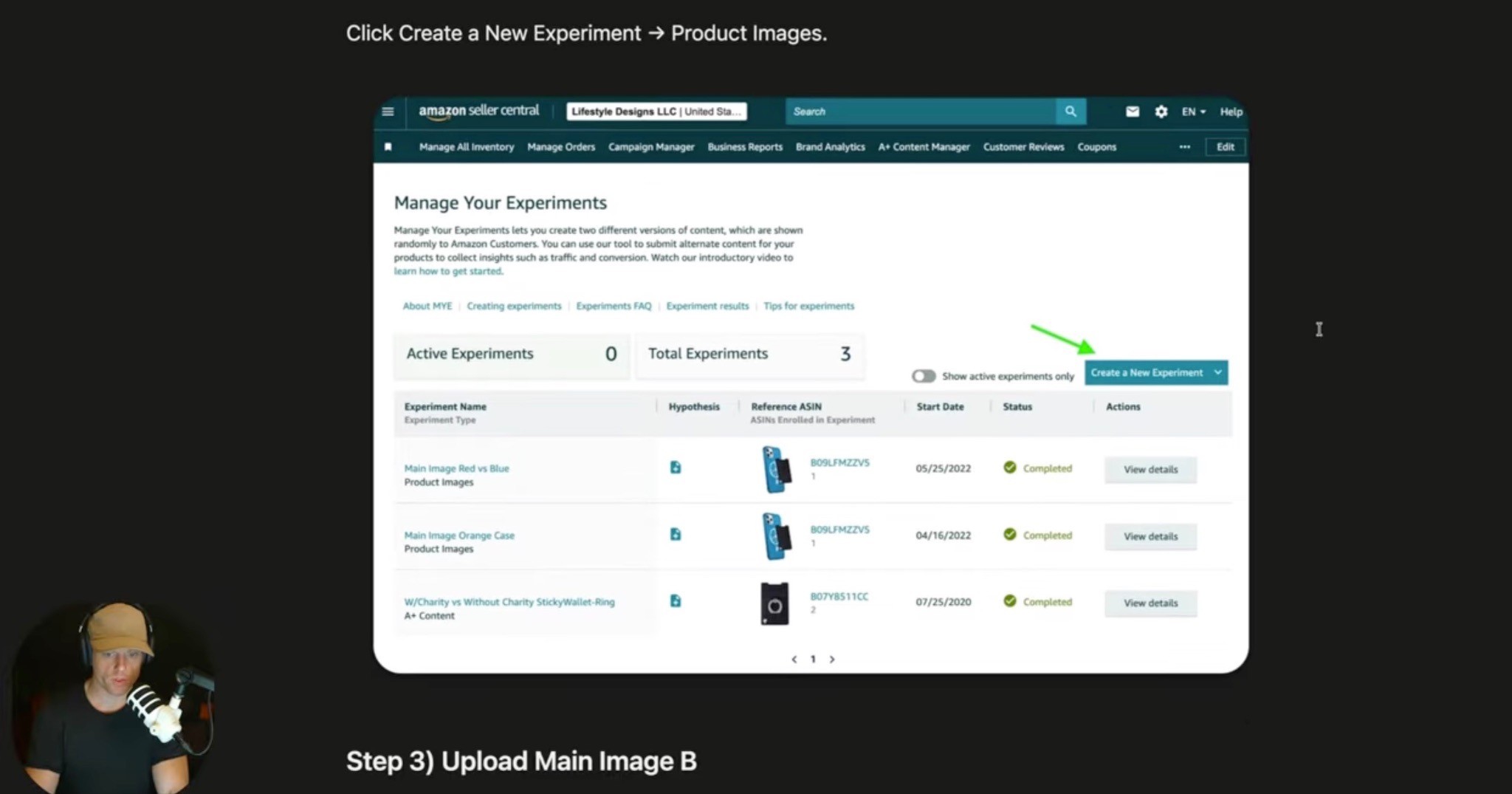
Do not just upload a new main image and guess.
Test it.
Inside Seller Central, use Manage Your Experiments.
The basic process:
Create a new experiment
Choose product images
Select the ASIN or child variation
Upload version A and version B
Schedule the experiment
Let it run
Analyze the results
Keep the winner
Test the winner against the next concept
The big mistake is running one test and stopping.
That is usually not enough.
The AB4 Method: Test Multiple Concepts

Here’s the playbook I like:
Create four main image concepts:
A
B
C
D
Then test like this:
Test A vs B
Take the winner and test it against C
Take that winner and test it against D
After that, you have a much better shot at finding the strongest image.
Yes, it takes longer.
But now you are not guessing.
You have data.
And if this is one of your top products, that image can keep working for you for months or years.
How Many Main Images Should You Test?
At minimum, test three.
If you have more strong ideas, test five.
If you have enough traffic and creative angles, testing more is fine.
The key is that the concepts should be meaningfully different.
Do not test tiny changes and call it strategy.
Test different ideas:
Bigger product
Product plus packaging
Product plus capsules
Bigger serving count
Different color direction
Bundle-focused version
Ingredient-focused version
Value-pack version
You are trying to learn what actually gets shoppers to click.
How to Analyze the Results
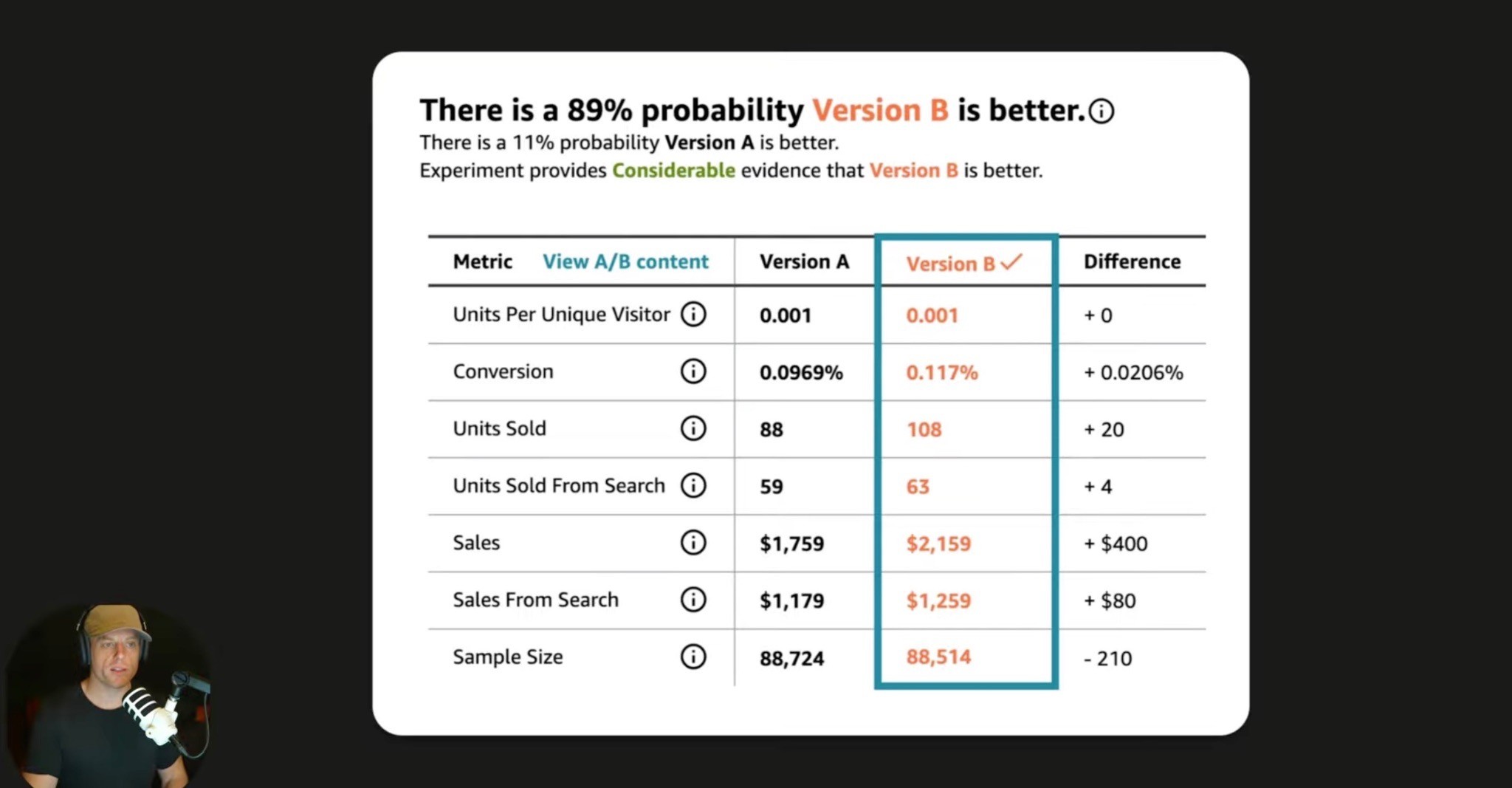
When the experiment ends, look at the data Amazon gives you.
Important metrics may include:
Units sold
Units sold from search
Total sales
Conversion-related data
Probability that one version is better
Amazon may not always show CTR directly the way you want.
So look at units sold from search and overall performance.
But use common sense too.
If an image gets more clicks but worse conversion, it may be attracting the wrong shopper.
The best main image gets more qualified clicks.
Not just more curiosity clicks.
Main Image Optimization Is Not Just CTR
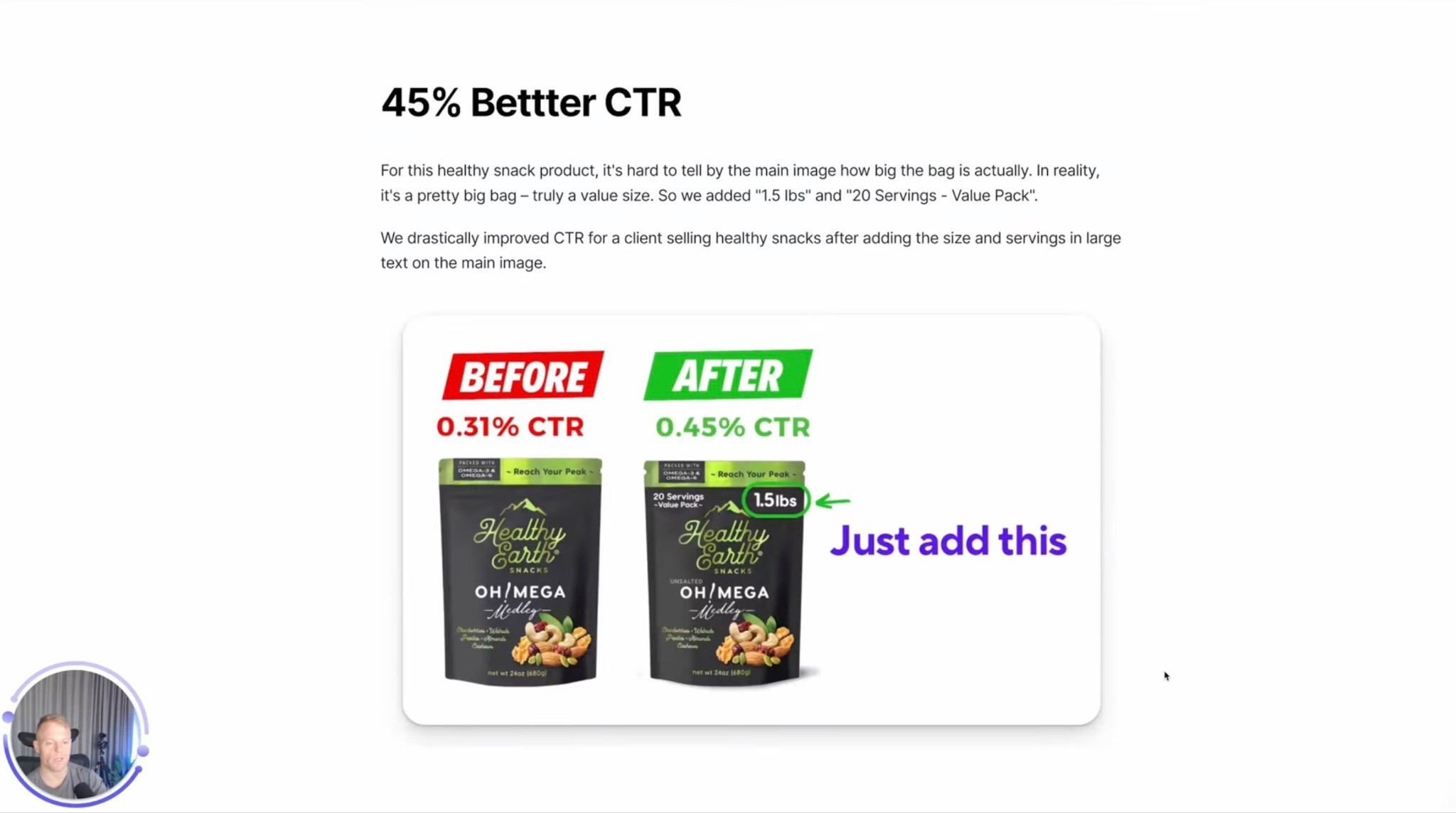
The main image mainly affects click-through rate, but it can also affect conversion.
Why?
Because it sets expectations.
If the image clearly shows what the product is and why it matters, the shopper who clicks is more likely to understand the product.
If the image is confusing or misleading, you may get clicks but lose shoppers on the page.
So the best main image does two jobs:
Gets the click
Attracts the right shopper
That is why main image optimization is not just a design task.
It is a conversion strategy task.
Main Image Optimization and Amazon Ranking
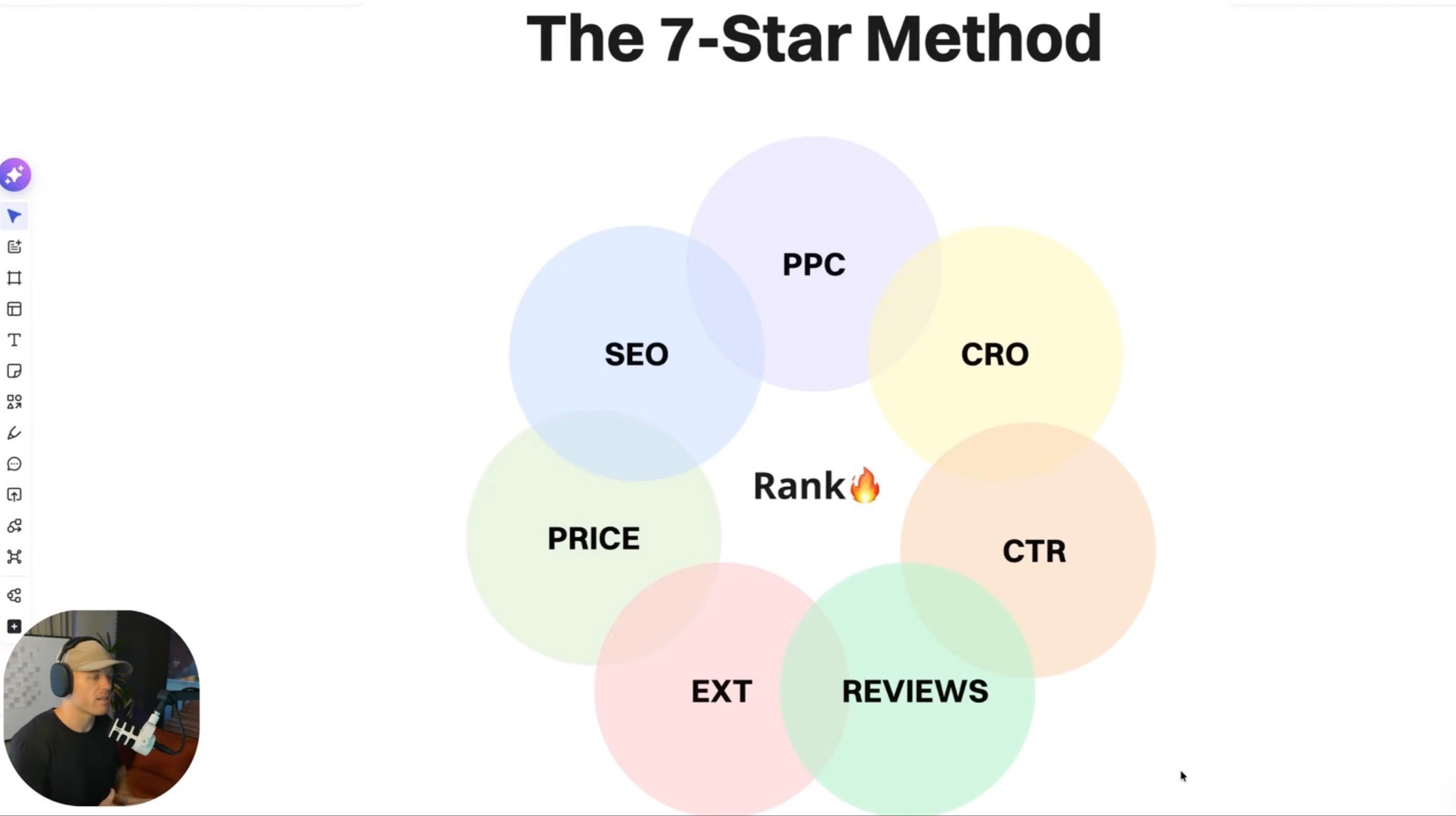
Main image optimization can support ranking because CTR and conversion affect the overall Amazon growth engine.
If more shoppers click and more of those shoppers buy, that helps sales velocity.
And sales velocity is a huge part of winning on Amazon.
But main image is not the only ranking factor.
Search terms matter.
Conversion rate matters.
Click-through rate matters.
PPC matters.
Reviews matter.
Price matters.
Everything works together.
So if you want the full ranking breakdown, watch my Amazon SEO Masterclass 2026: How to Rank Step by Step guide as well. CTR is a big piece of the puzzle, but ranking on Amazon takes the whole system working together.
Common Main Image Mistakes
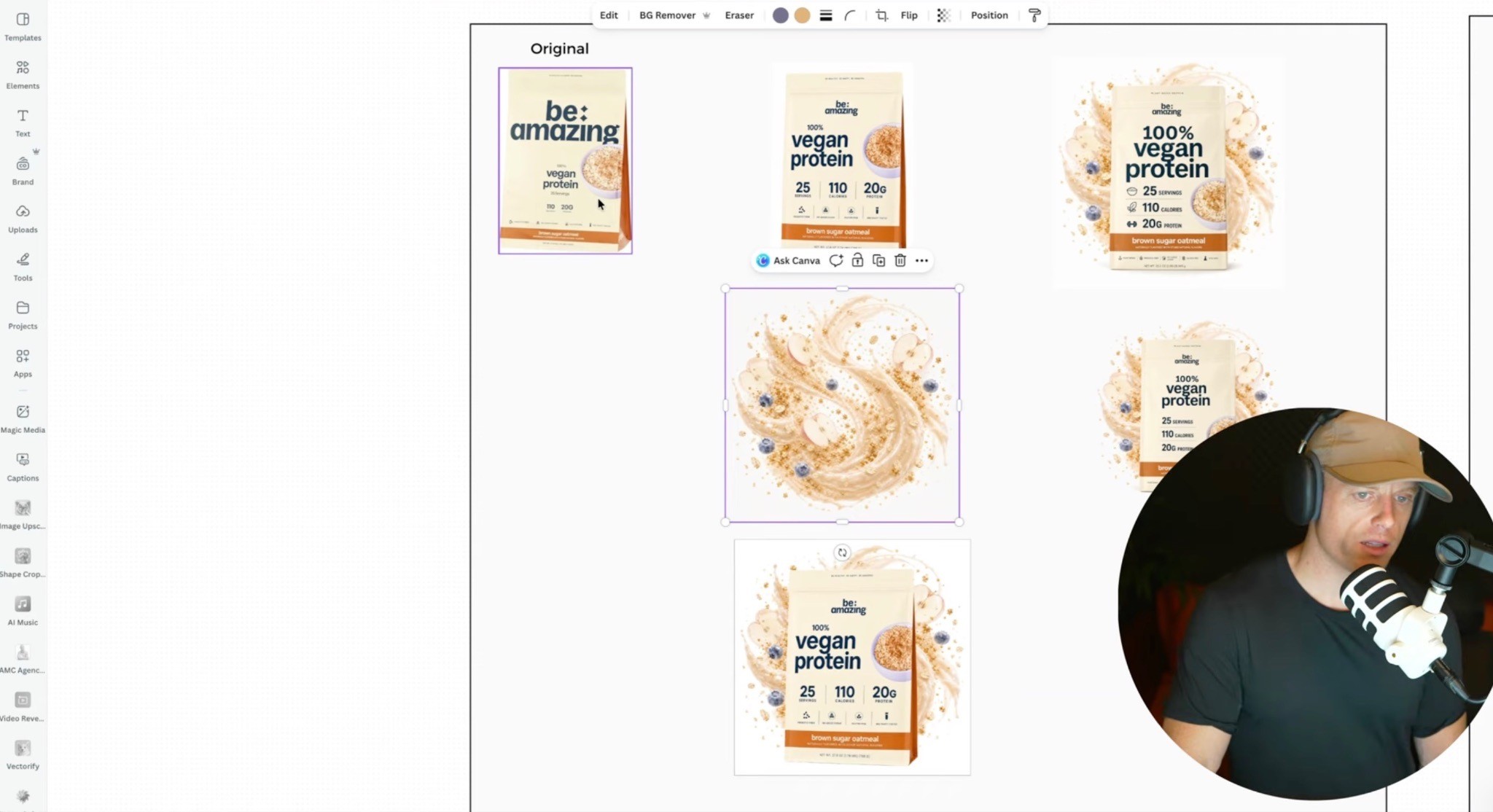
Mistake 1: The Product Looks Too Small
If your product does not fill enough space, it may look weak next to competitors.
Mistake 2: The Key Info Is Too Tiny
If the most important buying information is unreadable, the shopper may not understand why your product matters.
Mistake 3: It Blends Into the Category
If every competitor looks the same, find a strategic way to stand out.
Mistake 4: It Looks Low Quality
Bad lighting, blurry images, weak renders, or poor contrast can hurt trust instantly.
Mistake 5: It Shows the Wrong Value
If shoppers care about servings but your image only shows the logo, you are prioritizing the wrong thing.
Mistake 6: It Is Too Busy
More elements do not always mean more clicks.
The image still needs to be clear.
Mistake 7: It Has Not Been Tested
Your opinion does not matter.
My opinion does not matter.
The shopper’s behavior matters.
What About Amazon Terms of Service?
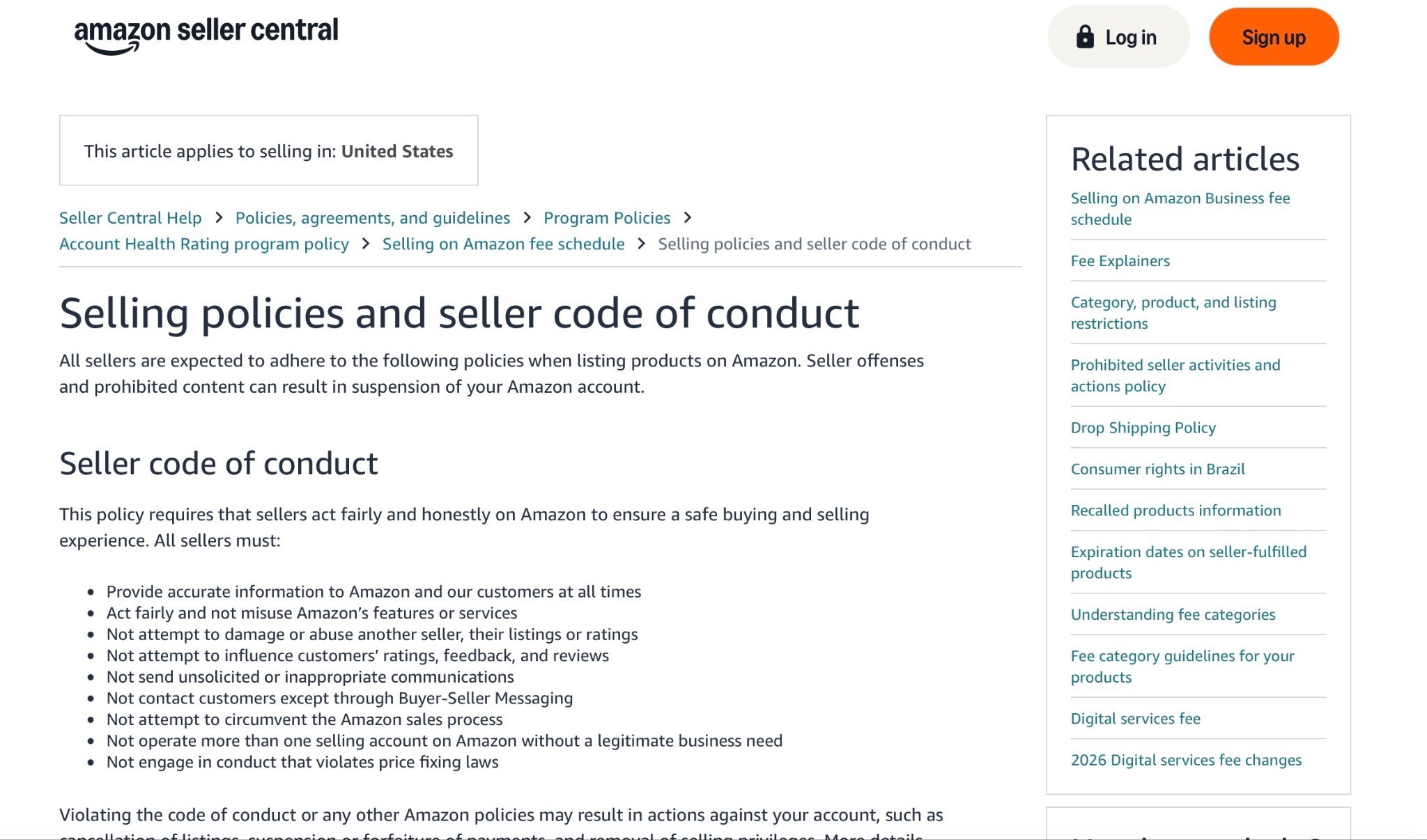
Use common sense and always check Amazon’s current category requirements before uploading anything.
Do not deceive or mislead shoppers.
Making real product information easier to understand is different from lying about what the customer gets.
But some tactics can be a gray area.
If Amazon does not approve the image, modify it and try again.
The simple rule is:
Help the shopper make a better buying decision. Do not trick them.
Amazon Main Image Optimization Checklist
Search Page
Does the image stand out on page one?
Does it work on mobile?
Does the product look big enough?
Is the image high quality?
Is there enough contrast?
Does it look better than nearby competitors?
Product Clarity
Can shoppers understand the product instantly?
Is the main USP clear?
Is the key information readable?
Does it show quantity, size, or scale if needed?
Does it show what is included?
Click Quality
Is the image attracting the right shopper?
Does it set accurate expectations?
Does it avoid misleading details?
Does it match the product page?
Testing
Do you have at least three concepts?
Are the concepts meaningfully different?
Did you test one main concept at a time?
Did you let the test run long enough?
Did you keep the winner and test again?
If you are not doing this, you are probably leaving money on the table.
FAQ
What is Amazon main image optimization?
Amazon main image optimization is the process of improving and testing your product’s primary search image so more qualified shoppers click your listing.
Does the Amazon main image affect CTR?
Yes. The main image is one of the biggest things shoppers notice in search results, along with price, reviews, rating, title, coupon, and delivery time.
Can Amazon main image optimization improve conversion rate too?
Yes, indirectly. The main image sets expectations. A clear, accurate image can attract better-qualified shoppers who are more likely to buy.
How many Amazon main images should I test?
Test at least three main image concepts. If you have enough traffic and strong creative ideas, test more.
How do you A/B test Amazon main images?
Use Manage Your Experiments inside Seller Central. Test one image against another, keep the winner, then test that winner against the next concept.
What should I put in my Amazon main image?
Show the product clearly, make key information easy to understand, and consider packaging, quantity, capsules, gummies, accessories, bundle items, or scale cues if they help shoppers understand the product faster.
Should I use AI for Amazon main image optimization?
Yes, but only as a tool. AI can speed up research and design iteration, but it should not replace strategy, product understanding, or testing.
Is it okay to edit the packaging in a main image?
Use common sense and check Amazon’s current image requirements. The goal should be to make real product information easier to understand, not deceive shoppers.
Summary
Your Amazon main image is not just a product photo.
It is your search-page billboard.
It is what shoppers see before they click.
So do not upload a basic product photo and call it good.
Study page one.
Understand the shopper.
Figure out the USP.
Make the key information glanceable.
Create multiple concepts.
Run real experiments.
Keep the winner.
Then test again.
Because you do not know what the best main image is until the market tells you.
And when you get it right, your CTR can improve, your sales can improve, and your PPC can work harder without spending more.
That’s why main image optimization is one of the easiest, lowest-hanging-fruit ways to increase Amazon sales.
Want Someone to Help You Figure Out Your Main Image?
If you’re looking at your main image and thinking, “Yeah… I have no idea what to test,” no shame in that.
This stuff gets weirdly specific.
It’s not just making the product bigger or prettier. You have to look at the keyword, the page-one competitors, what shoppers actually care about, what information needs to be bigger, what’s allowed, what’s worth testing, and what image concept has the best shot at getting more qualified clicks.
That’s basically what we do at our AmazingCreative Amazon Main Image Service.
We help Amazon brands create main image concepts that are built around CTR, not just aesthetics. We look at your product, your competitors, your USP, and the search results, then help you come up with strategic image variations worth testing.
If your product is getting impressions but not enough clicks, your main image might be one of the easiest things to fix first.
Want us to take a look? Click the button below to book an Amazon creative strategy call and we’ll help you figure out what might be holding the click back.
Riley Bennett
Amazon Strategist, 7-Figure Seller & Founder of AmazingCreative
Riley has been selling on Amazon and working with marketplace brands since 2015. He founded AmazingCreative to help brands improve their listings through stronger creative, clearer messaging, and conversion-focused strategy.
He has worked with more than 300 brands across Amazon CRO, PPC, SEO, product launches, and marketplace growth.
Since 2015 · Trusted by 300+ Brands · 7-Figure Amazon Seller

Amazon SEO
Optimize hidden keywords, stay within Amazon’s limits & improve discoverability.

See what Premium A+ offers, how to qualify, and how to build a clear layout.

Follow Amazon’s rules and build a gallery that answers shoppers’ questions.
Book a focused CRO strategy call or start with a complimentary listing audit.